SpringBoot 의 actuator를 이용하여 모니터링을 구축하는 하나의 예 이다. 물론 스프링부트가 아닌 항목과도 연계를 하여 모니터링을 할 수 있다. (대표적으로 Redis exporter 를 이용하여 Redis 모니터링)
이 글은 스프링부트 3.5.7 버전 기준으로 작성되었다. (다른버전에선 actuator - prometheus 동작을 위해 추가 설정이 필요할 수 있음)
요약하자면
- SpringBoot actuator + Micrometer 가 데이터를 제공 (actuator/prometheus uri 제공)
- Prometheus 가 해당 데이터를 수집 (외부)
- Grafana 가 이를 이용해 시각화 (외부)
Springboot Build.gradle 추가
- actuator와 prometheus용 Micrometer 추가
implementation 'org.springframework.boot:spring-boot-starter-actuator'
implementation 'io.micrometer:micrometer-registry-prometheus'
Application.yaml 추가
management:
  endpoints:
    web:
      exposure:
include: health,info,prometheus,metrics- GET http://localhost:8080/actuator/prometheus 를 통해 데이터 확인
Prometheus 설정
- Prometheus.yml 파일 추가
global:
  scrape_interval: 15s

scrape_configs:
  - job_name: spring-boot
    metrics_path: /actuator/prometheus
    static_configs:
- targets: ['host.docker.internal:8080']- host.docker.internal:8080 은, 컨테이너 -> 호스트머신 으로 접속할때 사용하는 주소 이다.
Prometheus 실행 (도커)
docker run -d \
  -p 9090:9090 \
  -v 실제설정파일위치/prometheus.yml:/etc/prometheus/prometheus.yml \
  --name prometheus \
prom/prometheus- GET http://localhost:9090 를 통해 실행 확인
- -v 실제 prometheus.yml 파일위치 : 복사할 위치
- 복사할 위치는 그대로 쓰면 되고, 실제 파일 위치를 확인해서 넣어줘야 한다.
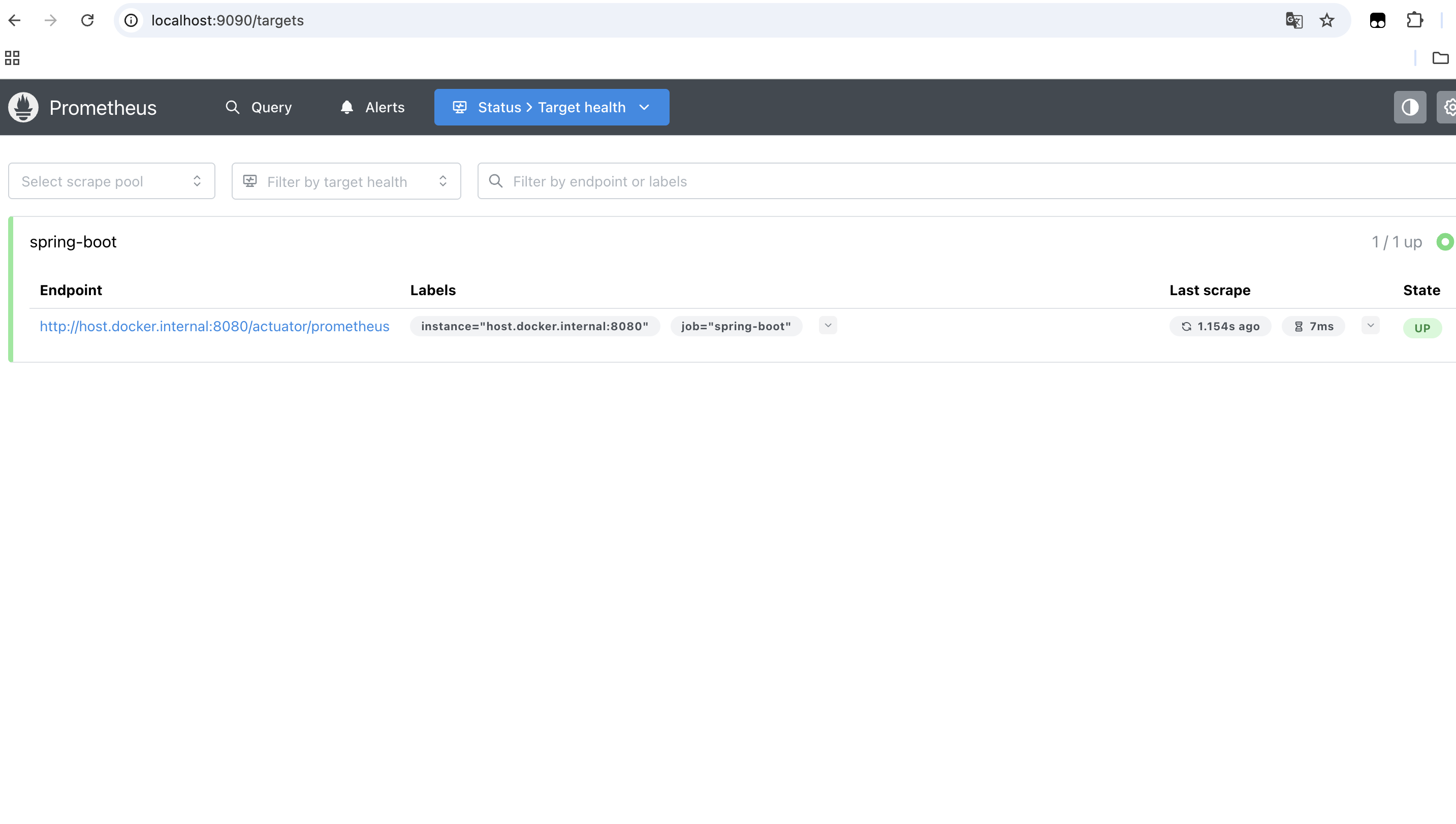
- localhost:9090/targets 에 springboot actuator 를 통해 데이터를 받아오고 있다면 성공이다.
Grafana 실행 (도커)
docker run -d \
  -p 3000:3000 \
  --name grafana \
grafana/grafana- Grafana 접속
- http://localhost:3000
- id / pw : admin / admin
Grafana 에서 Prometheus 연결
- Connections -> Data Sources -> Add data source -> Prometheus
- URL : http://host.docker.internal:9090
- Save & Test
Grafana 대시보드 만들기
- Dashboards -> Create dashboard -> import dashboard -> 중간 아이디를 입력하는곳에
- Spring Boot의 경우, 12900 입력 후 엔터
- 대시보드 우측 Edit -> 화면 하단 Query 에서 프로메테우스 쿼리를 통해 항목을 추가 할 수 있다.
- 좌측에서는 보여주는 UI 타입을 조절할 수 있다. 캐시 히트율 같은 경운 gauge로 하면 좋다.
sum(increase(cache_gets_total{result="hit"}[60m])) by (cache)
/
clamp_min(
  sum(increase(cache_gets_total[60m])) by (cache),
  1
)- 1시간동안 발생한 캐시의 히트율 계산 쿼리
연동 모습이다.

실제 AWS에 배포를 간단하게 하려면 기본적으로 다음의 구조를 따라야 한다.
- 각각 3개를 별도의 ECS 서비스로 구동
- VPC를 동일한것 사용
- 시큐리티 그룹을 통해 인바운드 규칙을 서로 연결되게끔 잡아줌
- 이때 prometeus.yml 에는 연결 설정을 변경해줘야 한다.
ecs_sd_configs:
- region: ap-northeast-2- 데이터 영속성을 위해 EFS 마운트 (/prometheus) 도 해주어야 한다.
- spring actuator 보안 설정을 해주어야 한다.
혹은, AWS에서 제공하는 서비스인 AMP, AMG를 연계하여 사용 할 수 있다.
'Backend > SpringBoot' 카테고리의 다른 글
| Kafka-Outbox 전략 구현 예 (0) | 2026.01.12 |
|---|---|
| Kafka (+Kafka UI) 설정 및 연동 (오류 핸들링 포함) (0) | 2026.01.12 |
| Cache 를 Actuator에서 확인하기 (Caffein 예) (0) | 2026.01.05 |
| Local Cache, Caffein (0) | 2026.01.05 |
| 서킷 브레이커 (0) | 2026.01.05 |